Field Service & Back Office AI · 3 min read
Plumbing AI Answering Service: How to Capture Emergency Calls Without Losing Control
A practical guide for plumbing owners evaluating AI answering services: what AI can capture, what on-call dispatch should approve, and what must stay monitored.
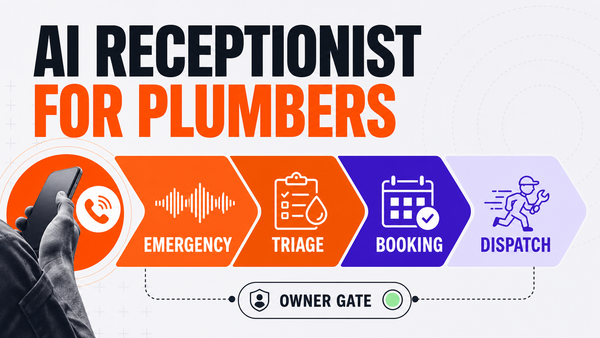
Direct answer: a plumbing AI answering service is useful when it captures missed calls, identifies burst-pipe, leak, sewer backup, water heater, and drain emergencies, drafts booking notes, logs call details, and routes exceptions to dispatch without making uncontrolled promises. The safe setup is not "AI books every job." The safe setup is AI intake plus dispatcher or owner approval for arrival windows, pricing language, service-area exceptions, and urgent technician routing.
What plumbing calls need the agent to understand
Plumbing call handling is not generic receptionist work. A useful system needs to know the difference between burst pipes, active leaks, sewer backups, clogged drains, water heater failures, sump pump issues, warranty callbacks, estimate requests, commercial service requests, and outside-service-area calls. It should capture the customer address, urgency, fixture or system involved, property type, preferred window, photos or notes when available, and whether the issue creates a safety or property-damage escalation.
The first job is accurate intake. If the AI cannot ask the right trade-specific questions, the downstream booking and dispatch step gets messy.
The safe workflow: answer, classify, draft, approve, log
| Step | What AI can do | Human gate |
|---|---|---|
| Call capture | Answer overflow or after-hours calls, record transcript, and collect customer details. | None for low-risk intake. |
| Plumbing triage | Classify burst pipe, leak, sewer backup, drain clog, water heater, warranty, estimate, or commercial call. | Dispatcher approves edge cases and urgent calls. |
| Booking draft | Suggest a booking window based on calendar and service rules. | Office manager approves exceptions, overbooking, and arrival promises. |
| On-call routing | Prepare a summary for the on-call tech or dispatcher. | Human approves emergency dispatch and customer promise. |
| CRM log | Save transcript, summary, source, next step, owner, and rollback note. | Weekly review catches misses, bad classifications, and workflow drift. |
Where plumbing AI answering usually breaks
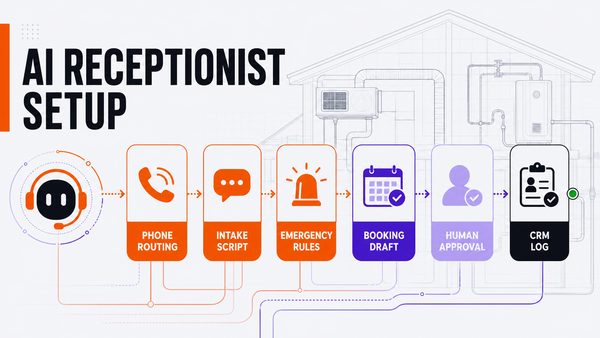
The common blocker is not the demo voice. It is the phone and operations plumbing: conditional call forwarding, number ownership, call routing, service-area rules, calendar availability, and who approves urgent dispatch decisions. If the shop still runs inbound calls through a cell phone or legacy landline, implementation should start with call-forwarding and escalation rules before any booking promises go live.
The second failure mode is letting AI sound confident about things it should not decide. Plumbing companies should keep pricing, discounts, refunds, warranty judgment, safety-sensitive language, emergency arrival windows, and technician route changes behind approval gates.
What to connect first
Start with overflow or after-hours missed-call capture. The first version should connect call forwarding, call transcript storage, calendar availability, service-area rules, on-call technician rules, and a CRM or field-service system such as ServiceTitan, Housecall Pro, Jobber, FieldEdge, HubSpot, Airtable, or a structured spreadsheet.
Once the intake flow is accurate, the next layer is managed monitoring: accepted drafts, rejected drafts, misclassified calls, failed tool calls, unresolved customer replies, and recurring exceptions.
How Omni Studio fits
Omni Studio is not a generic answering bot. It is a managed AI operations layer for home-service workflows. For plumbing teams, that means mapping the call flow, creating the intake script, defining approval rules, connecting the source systems, monitoring exceptions, and improving the workflow after launch.
If you are evaluating plumbing AI answering, start with an AI automation audit. If the workflow is already near live operations, review managed AI Ops. If you need to decide whether the workflow is ready for AI, use the AI Ops readiness scorecard.
FAQ
What is a plumbing AI answering service?
A plumbing AI answering service answers or responds to inbound calls, captures leak, drain, sewer backup, water heater, estimate, warranty, and after-hours details, classifies urgency, drafts booking notes, and routes exceptions for dispatcher review.
Can AI answer after-hours plumbing emergency calls?
AI can capture details and flag urgent plumbing calls, but arrival promises, pricing language, safety-sensitive guidance, warranty judgment, and technician routing should stay approval-gated until the workflow is proven.
What should plumbing AI answering connect to?
The safest stack connects call intake, conditional forwarding, calendar availability, service-area rules, on-call rules, CRM or field-service software, transcript storage, and a review queue.
Is Omni Studio replacing my plumbing dispatcher?
No. Omni Studio is a managed AI operations layer. It helps intake, draft, route, summarize, log, monitor, and improve workflows while dispatchers and owners keep control of sensitive decisions.