Managed AI Ops · 6 min read

Managed AI Infrastructure for Small Business Operators

Learn what managed AI infrastructure means for small business operators, including models, tools, permissions, monitoring, approvals, and rollback.

OS By Omni Studio · 03 Jun 2026
Omni Studio operator control-plane visual for Managed AI Infrastructure for Small Business Operators.

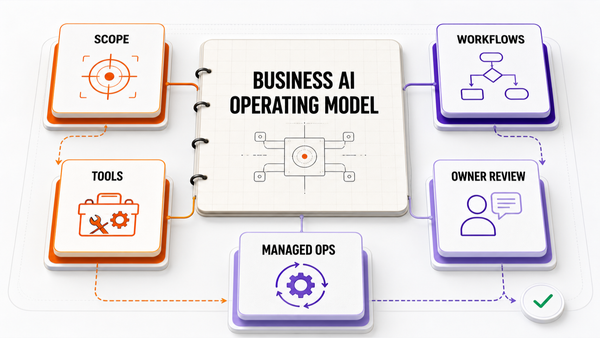
Direct answer: Managed AI infrastructure for a small business is the practical layer that connects models, business tools, data sources, permissions, evals, logs, approval queues, fallback paths, and human owners. It is what turns AI from a chat window into a governed operating system.

This article is written for operators who are evaluating AI as an operating system, not as a one-off demo. The useful test is whether the workflow can be scoped, sourced, approved, monitored, and improved without creating new risk for customers, revenue, or public-facing work.

What Operators Actually Need To Decide

Most small teams do not want to manage model routing, tool authentication, prompt updates, broken integrations, data boundaries, and quality review. They want a business workflow to run with less friction. Managed infrastructure exists to make the invisible operating parts explicit: what the system knows, what it can do, where it logs, and who approves the next step.

For AEO and buyer-intent search, the page needs to answer the question directly, show the decision framework, and make the tradeoffs visible. That is also how the workflow should be bought: define the job, define the source of truth, define what AI is allowed to do, and define who approves the result.

Where This Fits In The Current Tool Landscape

Modern automation tools are moving toward agents, but the operating model still matters. Official platform documentation now commonly describes AI agents or assistants in terms of instructions, connected tools, knowledge, workflow automation, and review. The implication for a small business is simple: the tool can be powerful, but the workflow still needs ownership.

Layer What it handles Operator takeaway
Model API Provides the language model or reasoning layer. Not enough by itself; it does not define business permissions, monitoring, source truth, or handoff.
Automation platform Connects tools and runs workflows. Useful foundation, but someone still has to design prompts, tools, evals, and exception handling.
Managed AI infrastructure Combines model, tools, data, permissions, approvals, logs, and operating cadence. Best when the business wants AI to support real workflows without hiring an internal AI platform team.

Operator Examples

Source-of-truth mapping

A managed layer defines which docs, records, tickets, databases, and dashboards can be used for each workflow. This prevents the agent from mixing stale context with current operating rules.

Permission tiers

Read-only, draft-only, recommend-and-route, execute-with-approval, and never-execute permissions keep risky actions from moving too quickly.

Observability

Logs, traces, failed tool calls, approval rejections, and recurring edge cases are reviewed so the workflow improves instead of silently drifting.

The Approval-Gated Operating Model

A safe first implementation does not start by giving an agent unlimited control. It starts by separating lower-risk support work from high-impact actions. Reading, summarizing, drafting, routing, and preparing are different from sending, publishing, refunding, repricing, deleting, or changing customer-facing commitments.

The practical permission ladder is:

  • Read-only context
  • Draft-only output
  • Recommend and route
  • Execute with human approval
  • Never execute

That ladder gives the business room to learn where the system is reliable before expanding what it can do. It also gives managers a way to evaluate progress with actual rejected drafts, corrected outputs, missed context, and recurring edge cases rather than vibes.

Controls That Should Exist Before Launch

  • Central source inventory
  • Permission tiers by workflow
  • Trace logs and approval outcomes
  • Fallback plan for failed tools and ambiguous cases

These controls are not bureaucracy. They are the reason an AI workflow can become part of normal operations. Without them, the company may still have an impressive demo, but the owner will not know what happened, why it happened, or how to reverse it when an edge case appears.

A Practical Implementation Roadmap

The best first build is usually small and strict. Start by picking one workflow that already has repeatable inputs and a clear human owner. Document the current path, including where the request starts, which systems hold the facts, who approves the output, and what happens when the workflow stalls. That map becomes the source-of-truth brief for the agent or automation layer.

Next, define the agent's permission level before connecting tools. A read-only workflow can summarize records and prepare notes. A draft-only workflow can create suggested copy, reports, or task updates. A recommend-and-route workflow can decide who should review the work next. Execute-with-approval should come later, after the business has evidence from real examples. Never-execute rules should be written down explicitly so the system cannot drift into sensitive areas by accident.

Finally, launch with a review loop instead of a "set it and forget it" mindset. The owner should review rejected drafts, missed context, failed tool calls, slow handoffs, and repeated edge cases. Those examples become the next improvement cycle. This is how a workflow moves from experiment to operating system without pretending the agent is perfect on day one.

What To Measure Before Calling It Working

Do not judge an AI workflow by whether it feels impressive in a demo. Judge it by operational evidence: how many drafts were accepted, how many were corrected, where humans still had to intervene, what exceptions repeated, and whether the team can explain why an output was produced. The goal is not blind autonomy. The goal is a workflow that becomes easier to trust because the approvals, logs, and failure modes are visible.

For a high-AOV buyer, this measurement layer is part of the product. If a vendor cannot show how quality is reviewed after launch, the business is buying implementation without operations. Omni Studio's strongest position is to make that ongoing operating layer explicit: define the workflow, instrument it, improve it, and keep risky actions reviewable.

How Omni Studio Should Be Evaluated

Omni Studio should be evaluated by its ability to turn a messy business workflow into a controlled operating lane. A strong engagement should produce a source map, permission rules, draft queues, review criteria, monitoring, and a weekly improvement rhythm. The goal is not to make the business sound more technical. The goal is to make important work move with fewer hidden handoffs.

For high-AOV buyers, the strongest buying signal is usually not interest in a chatbot. It is a workflow with enough repetition, revenue impact, or operational risk that a managed implementation is worth owning carefully. That is where a service-led AI operating partner can be more valuable than another self-serve tool.

Common Failure Modes To Avoid

The first failure mode is automating before the workflow is understood. If nobody can explain the current process, the agent will inherit the confusion. The second failure mode is connecting too many tools too early. More access can make the demo feel powerful while making the system harder to audit. The third failure mode is skipping eval examples. Without known-good and known-bad examples, the team cannot tell whether the system is improving or just producing confident output.

The fourth failure mode is treating approvals as friction instead of learning. Early approval queues reveal where instructions are vague, source data is missing, or the workflow is not ready for more autonomy. The fifth failure mode is leaving ownership unclear after launch. Someone has to review exceptions, tune instructions, monitor cost and latency, and decide which actions can move from draft-only to approval-gated execution. A managed partner should make that ownership visible from the start.

Source Notes

The recommendations above are based on the current public documentation and positioning from the relevant platform categories. Use these as source references when comparing native ecommerce AI, workflow automation, and agentic automation:

Related Omni Reading

FAQ

What is included in managed AI infrastructure?

It includes models, tool connections, source mapping, permissions, evals, observability, approval queues, fallback rules, and maintenance ownership.

Is managed AI infrastructure the same as using ChatGPT?

No. A chat model is one component. Managed infrastructure connects that component to safe business workflows and operational controls.

When does a small business need managed AI infrastructure?

When workflows cross multiple tools, involve sensitive actions, require approvals, or need ongoing monitoring that the team does not want to own alone.

OS
Omni Studio