AI Implementation · 4 min read
How Small Business Owners Use AI in Daily Operations
A practical guide to how small business owners use AI in daily operations without losing approval control.
The Omni model: one managed AI Employee owns one recurring workflow; specialist employees add capacity around the same business context; your team keeps the judgment calls.

Direct answer: Small business owners are using AI to handle repeatable operational work: intake, summaries, routing, follow-up, reminders, reporting, and first-pass checks. The useful version is not a pile of disconnected tools. It is a controlled workflow with a source of truth, escalation rules, and human approval where the business can be exposed to risk.
Question cluster this article supports
- how are small business owners using AI
- how can I use AI to run my business
- which AI is best for small business owners
- managed AI Ops
- AI front office
AI operating models for a service business compared
| Model | Effort | Control | Ongoing ops | Best for |
|---|---|---|---|---|
| DIY with off-the-shelf tools | High | Full | Owner-run | Technical owners with time |
| Agency build, then hand off | Medium | High at build | Owner-run after launch | One-time projects |
| Managed AI Ops (Omni Studio) | Low for buyer | Approval-gated | Operator-run with owner sign-off | Owners who want outcomes, not tooling |
Start with daily work, not AI novelty
The best use cases are usually the ordinary ones. Owners do not need AI to sound impressive. They need it to reduce the number of times staff retype a caller note, chase a quote, summarize a request, or sort through unclear follow-up.
That is why the strongest first question is not which AI tool looks best. It is which workflow happens every day, has repeatable rules, and can be reviewed before it affects a customer, a schedule, a payment, or the company reputation.
The daily operations where AI fits first
Small businesses use AI safely when the task has clear inputs and a clear next step. Call intake, quote reminders, appointment confirmations, job-note cleanup, review requests, lead triage, and simple reporting usually fit that pattern.
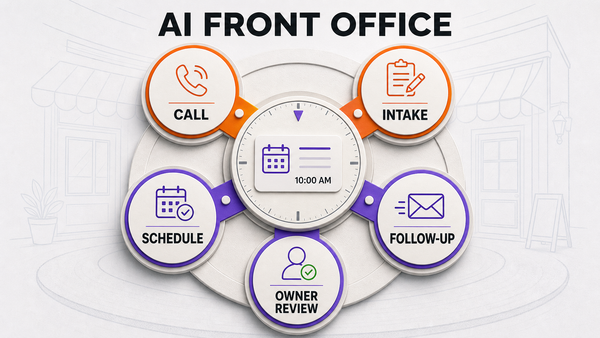
For a service operator, the AI front office can collect request details, separate urgent jobs from routine ones, draft the next action, and send exceptions to the owner or dispatcher. That gives the team speed without turning judgment over to the software.
Where owners should keep approval gates
Approval gates matter when the AI is close to a customer promise. Pricing, refunds, safety issues, account changes, angry customers, unusual access notes, same-day scheduling promises, and high-value leads should not be left to a generic assistant.
A managed AI Ops process keeps those moments visible. The AI can prepare the summary, collect missing details, and suggest a route, but the operator still decides when a risky action is approved.
How to avoid tool sprawl
Many owners start with one writing assistant, one call tool, one automation tool, one reporting tool, and one inbox helper. That can become another operations mess if no one owns the handoff between them.
A cleaner approach is to map the workflow first. Define the source system, the fields the AI must collect, the allowed action, the escalation trigger, and the person responsible for reviewing failures after launch.
What to measure after launch
Measure missed calls recovered, required fields captured, follow-ups sent, escalations created, bad handoffs, and corrections by staff. Those numbers show whether AI is improving the operation or only creating cleaner-looking text.
The owner should also review repeated confusion. If customers keep asking the same thing, the workflow may need better source data, clearer routing rules, or a narrower allowed action set.
A practical first 30 days
In the first week, keep the AI in a narrow lane and review every exception. The owner or operations lead should look for missing intake fields, unclear summaries, slow handoffs, and any moment where the AI tried to be more confident than the workflow allowed.
In the second and third weeks, tune the repeatable rules instead of expanding too fast. Improve the intake script, add clearer escalation triggers, and remove any action that creates staff rework. By the fourth week, the business should know whether the workflow is saving time, creating cleaner records, and surfacing the right approvals.
That small operating cadence matters because AI becomes useful through repetition. A business that reviews the workflow weekly will usually learn more than a business that launches a broad assistant and hopes the tool handles the messy parts on its own.
Internal routes to review next
For a practical rollout path, start with AI front office for small business, then use the AI automation audit to decide which workflows are safe to automate first.
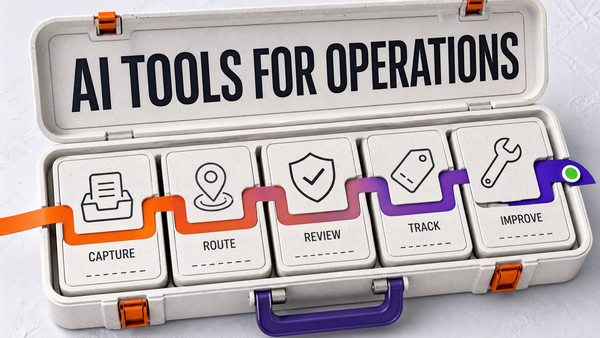
If the operation already has multiple connected workflows, review managed AI Ops and the related guide on AI tools for business operations.
External reference
For broader small-business AI context, see SBA guidance on AI for small business.
Frequently asked questions
How are small business owners using AI?
Small business owners use AI for intake, summaries, routing, reminders, follow-up, reporting, and first-pass checks. The safest use cases are repeatable workflows with clear source data, logs, and human approval for sensitive decisions.
How can I use AI to run my business?
Start by choosing one workflow that happens often, has clear rules, and can be reviewed. Define the trigger, required fields, destination system, allowed actions, escalation path, and review owner before AI touches customers.
Which AI is best for small business owners?
The best AI is the one that fits a specific workflow and has guardrails. For many operators, a managed AI front office or managed AI Ops layer is more useful than another disconnected tool.
What should a small business not automate first?
Do not start with pricing exceptions, legal-sensitive communication, safety decisions, angry customers, refund disputes, or workflows where the source data is unreliable. Those areas need stronger approval rules first.
References
Authoritative sources referenced in this article:
Check whether this workflow is ready for AI Ops
Before expanding the workflow, use the AI Ops readiness scorecard to confirm the owner, source systems, approval gates, exception path, and weekly review loop are clear.