AI Implementation · 8 min read
AI Tools for Business Operations
A practical guide to choosing AI tools for business operations without losing approval, auditability, or workflow ownership.
The Omni model: one managed AI Employee owns one recurring workflow; specialist employees add capacity around the same business context; your team keeps the judgment calls.

Direct answer: The best AI tools for business operations are the ones tied to repeatable work: intake, scheduling, follow-up, CRM cleanup, reporting, monitoring, and exception routing. The tool category matters less than whether the workflow has clear inputs, source systems, approval rules, and a human owner after launch.
Keyword cluster this article supports
- ai for business
- ai tools for business
- artificial intelligence in business
- ai business
- ai tools for business automation
- top ai tools for business
AI operating models for a service business compared
| Model | Effort | Control | Ongoing ops | Best for |
|---|---|---|---|---|
| DIY with off-the-shelf tools | High | Full | Owner-run | Technical owners with time |
| Agency build, then hand off | Medium | High at build | Owner-run after launch | One-time projects |
| Managed AI Ops (Omni Studio) | Low for buyer | Approval-gated | Operator-run with owner sign-off | Owners who want outcomes, not tooling |
Do not start with the tool list
Most AI tool searches start with product categories. That can be useful, but it usually skips the harder question: which workflow should be trusted with automation first?
A better buying process starts with operational fit. If a workflow is repetitive, source-backed, low ambiguity, and approval-friendly, it may be a good AI candidate. If the workflow requires judgment, pricing authority, safety review, or policy interpretation, the tool needs stronger guardrails.
The useful AI tool categories
- AI reception and answering tools for call intake, summaries, and routing.
- Scheduling and dispatch tools for window suggestions, conflict checks, and follow-up.
- Workflow automation tools for CRM updates, task creation, notifications, and reporting.
- Customer follow-up tools for estimates, invoices, reviews, and missed-call recovery.
- Monitoring tools for errors, stale sources, failed handoffs, latency, and cost.
What makes an AI tool operationally safe
A safe AI operations tool should have a clear source of truth, a defined action boundary, a rollback path, and visible logs. The operator should know what the AI can do, what it cannot do, and when the workflow asks for approval.
If the tool cannot explain why an action happened or cannot route uncertain cases to a human, it may be fine for drafting but weak for operations.
When managed AI Ops is better than another tool
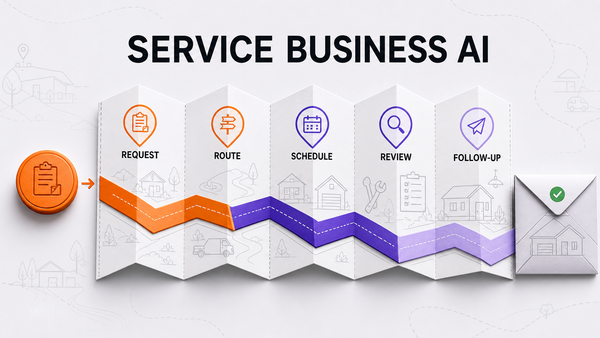
A single tool can solve a narrow task. Managed AI Ops is useful when the business has several connected workflows: calls become jobs, jobs become estimates, estimates need follow-up, follow-up changes revenue, and every handoff affects customer trust.
In that environment, the work is not just tool setup. It is workflow ownership, QA, monitoring, exception design, and ongoing improvement.
Where teams should start
Start with the workflows where mistakes are visible and reversible. Missed-call follow-up, estimate reminders, appointment confirmations, job-note cleanup, and simple reporting are usually safer than pricing decisions or policy-heavy support.
A good first workflow should have a clear trigger, a small set of required fields, a known destination system, and an owner who can review the results. If nobody owns the workflow after launch, the tool will drift.
What to ask vendors before buying
Ask where the tool gets its information, what it logs, how exceptions are escalated, and whether humans can approve risky actions before they happen. Also ask what happens when a source system changes or a workflow breaks.
The best answer is not a promise that the AI never fails. The best answer is a clear operating process for catching failures, reviewing them, and improving the workflow without losing customer trust.
How to compare tools without getting distracted
Compare tools around workflow outcomes instead of demo polish. A flashy demo matters less than whether the tool can follow your intake rules, update the right system, explain its actions, and stop before it makes a risky decision.
For operations, the practical question is whether the tool helps the team move work forward. If it creates extra review queues, duplicate records, unclear ownership, or untracked customer promises, it is not really improving operations even if the AI output looks impressive.
The strongest tools make the boring parts clearer: who owns the next step, what changed in the system of record, which customer is waiting, and what needs approval before the workflow continues.
That clarity is usually what separates a useful operations tool from another disconnected AI experiment.
It also makes future audits much easier.
Evaluation checklist
- What workflow does this tool own?
- Which system is the source of truth?
- What actions can the AI take without approval?
- Which cases must be escalated?
- What logs, evals, or dashboards prove the workflow is working?
- Who reviews failures and updates the workflow after launch?
Internal routes to review next
Use the AI workflow opportunity checklist to score candidate workflows. Then review AI automation audit if you need a structured way to decide what to automate first.
For operating model context, read AI automation company vs managed AI Ops and managed AI operations.
Direct answer: which AI tools fit small-business operations
The best AI for small business owners is usually not one standalone tool. It is a controlled workflow around intake, routing, follow-up, reporting, and approvals, with a clear operator responsible for what the AI may do and what it must escalate.
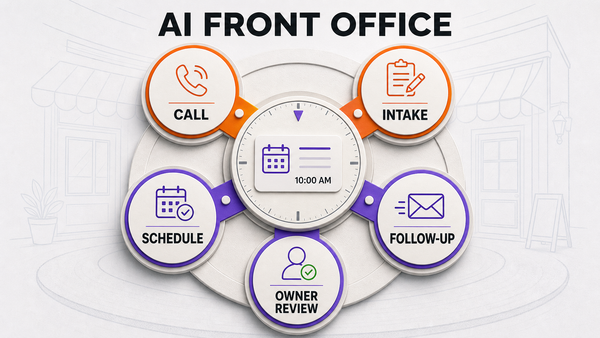
Related Omni Studio routes: AI front office for small business AI automation audit managed AI Ops
AlsoAsked questions operators search before buying
Which AI is best for small business owners?
The best AI for small business owners is the AI that supports a clear workflow with measurable outcomes, clean data, and human review around sensitive steps. For many operators, that means a managed AI front office or managed AI Ops layer rather than another disconnected app.
How are small business owners using AI?
Small business owners use AI to capture calls, summarize requests, route work, draft replies, follow up on quotes, create internal notes, and reduce repetitive admin. The safest use cases are repeatable workflows with defined rules, logs, and escalation paths.
AI Tools For Business Operations FAQ
What are the best AI tools for business operations?
The best tools are the ones matched to a specific workflow, such as intake, scheduling, follow-up, reporting, or monitoring. Fit, controls, and ownership matter more than broad feature lists.
Should a small business use one AI platform or several AI tools?
A small business can use several tools if there is a clear source of truth and workflow owner. If tools create fragmented handoffs, managed AI Ops may be the better operating layer.
What should not be automated first?
Avoid starting with pricing exceptions, legal-sensitive communication, safety-sensitive decisions, angry customer escalations, or workflows where the source data is stale or unclear.
More question keywords: AI workflow automation
These questions capture owners who are not ready to buy an AI receptionist yet, but are actively researching how AI can reduce operational work. The answer should pull them toward workflow automation, AI front office, and managed AI Ops.
Related Omni Studio routes: AI front office AI automation audit managed AI Ops
What is AI workflow automation for small business?
AI workflow automation uses AI to help with repeatable business steps such as intake, summaries, routing, follow-up, reminders, and reporting. For small businesses, it works best when every automated step has a source of truth, a clear owner, logs, and approval rules for sensitive actions.
What are the best AI automation tools for small business operations?
The best AI automation tools are the ones that fit a specific workflow instead of adding another disconnected app. A service business should compare tools by source-system fit, handoff quality, approval controls, monitoring, and whether staff can inspect what the AI did.
How can AI automation save time for a small business?
AI automation saves time by reducing repeated admin work: collecting the same intake fields, summarizing calls, drafting follow-ups, checking missing details, routing work, and preparing reports. It saves the most time when the workflow is reviewed and improved after launch.
What tasks should a small business automate first with AI?
Start with frequent, low-risk tasks such as missed-call follow-up, appointment reminders, quote follow-up, job-note cleanup, lead qualification, and simple reporting. Do not start with pricing exceptions, safety decisions, refunds, or anything that needs owner judgment.
References
Authoritative sources referenced in this article:
Who this is for
This guide is for small-business owners and operators comparing AI tools with managed AI workflows.
How this was built
Omni Studio structured this article from service-business operating workflows, including intake, routing, follow-up, approval gates, and back-office handoffs that affect AI tools for business operations.
Why this exists
The goal is to help operators separate useful AI implementation decisions from tool-first automation that lacks ownership, review, or measurable operating proof.
Last reviewed: July 1, 2026 by Omni Studio.
Outside reference: The SBA notes that small businesses should weigh both AI benefits and risks before adopting tools inside daily operations. See SBA AI for small business guidance.
Admin replacement AI workflow questions
These questions capture owners deciding whether to hire another admin or automate the repeatable office work first.
What AI workflow should a small business build before hiring another admin?
Before hiring another admin, build the workflow that repeats every day: missed-call follow-up, quote reminders, appointment confirmations, CRM note cleanup, lead routing, or simple reporting. If the task is frequent, rule-based, and reviewable, it is a strong AI automation candidate.
How do I know if AI can replace admin work?
AI can replace admin work when the task follows known rules, uses clean source data, has a clear output, and can be reviewed. It should not replace judgment-heavy customer conversations, policy exceptions, financial decisions, or sensitive complaints.
What admin tasks should stay human?
Keep emotional customer calls, pricing exceptions, hiring decisions, refunds, safety questions, policy disputes, and unusual scheduling commitments with a human. AI should prepare context and drafts, not quietly own judgment-heavy decisions.
How should a business measure admin AI savings?
Measure admin AI savings by tracking response time, missed leads recovered, follow-ups completed, manual corrections, staff hours removed, escalation quality, and whether the team has cleaner records after the workflow runs.