Field Service & Back Office AI · 3 min read

HVAC Dispatch Automation: Balance Technicians Without Losing Control

A practical dispatch automation guide for HVAC owners, dispatchers, and office managers evaluating AI support without unsafe autonomous scheduling.

OS By Omni Studio · 25 May 2026
Omni Studio operator control-plane visual for How a HVAC Operator Eliminated Ghost Dispatches and Balanced Field Workloads.

Direct answer: HVAC dispatch automation helps a home-service team classify incoming work, read customer and job context, suggest the right technician, surface route or schedule conflicts, draft dispatcher notes, and log approved next steps. The safe version does not replace the dispatcher. It gives the dispatcher a cleaner queue, better context, and approval gates before customer-impacting actions happen.

Why HVAC dispatch automation is a buying-intent problem

HVAC owners and dispatchers search for dispatch automation when the board is already painful: missed calls, overloaded technicians, poor skill matching, unclear availability, callbacks, warranty questions, and too much manual follow-up. That is a commercial problem, not a casual AI topic.

The goal is not to promise autonomous scheduling. The goal is to reduce messy admin work while preserving human judgment around arrival windows, emergencies, pricing, warranty concerns, and customer trust.

The dispatcher-safe workflow

Dispatch layer What AI can prepare Human approval gate
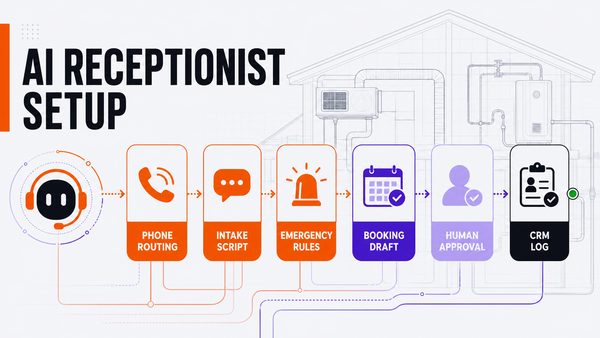
Call intake Summarize caller, issue, equipment, location, urgency, and service history. CSR or dispatcher confirms job type and urgency.
Skill match Suggest technicians based on trade, equipment, certifications, workload, and prior jobs. Dispatcher approves the technician assignment.
Route and schedule Surface nearby jobs, travel time, open windows, and capacity conflicts. Dispatcher approves customer-facing arrival windows.
Exception routing Flag warranty, callback, upset customer, emergency, or pricing-sensitive cases. Manager or owner handles high-risk exceptions.
CRM logging Draft job notes, dispatch summary, follow-up task, and next-step record. Staff approves before irreversible record changes.

What AI should never decide alone

AI should not independently promise arrival windows, override service-area rules, quote emergency pricing, approve refunds, change technician assignments in a way that affects customers, handle warranty disputes, or send public/customer-sensitive messages without review. Those actions need explicit owner or dispatcher approval.

Approval is not a slowdown. It is how the team learns where the workflow is missing source data, where instructions are unclear, and where a routing rule needs improvement before the system gets more autonomy.

What to measure

Track accepted dispatch suggestions, rejected suggestions, missed-call recovery, approval latency, route changes, technician workload balance, unresolved exceptions, failed tool calls, and customer callbacks that still need human review. These measures prove whether dispatch automation is making the board easier to run.

If the team cannot see rejects, exceptions, or source freshness, the automation is not ready for expansion. A demo can look clean while the live dispatch board stays messy.

How Omni Studio fits

Omni Studio is a managed AI operations partner for practical home-service workflows. For HVAC dispatch automation, that means mapping intake, job context, technician skills, schedule rules, approval gates, eval examples, CRM logging, and the weekly review rhythm after launch.

Start with the AI automation audit if you need to choose the first workflow. Use the AI Ops readiness scorecard if you need to decide whether dispatch is ready. Review managed AI Ops if you need ongoing monitoring, exception review, and improvement after launch.

Related home-service workflows

FAQ

What is HVAC dispatch automation?

HVAC dispatch automation helps classify incoming calls, read customer and job context, suggest technician matches, surface route or schedule conflicts, draft dispatcher notes, and log approved dispatch actions inside the CRM or field-service system.

Should AI schedule HVAC technicians automatically?

Usually not at first. AI can suggest windows, routes, and technician matches, but arrival promises, emergency triage, warranty issues, pricing questions, and customer-impacting schedule changes should stay dispatcher-approved.

What should HVAC dispatch automation measure?

Useful metrics include accepted dispatch suggestions, rejected suggestions, missed-call recovery, approval latency, route changes, technician workload balance, unresolved exceptions, failed tool calls, and customer callbacks that still need human review.

How does Omni Studio help HVAC teams with dispatch automation?

Omni Studio maps dispatch workflows, connects source systems, defines approval gates, creates eval examples, launches draft-first queues, monitors exceptions, and manages the improvement loop after launch.

OS
Omni Studio