Reliability & Guardrails · 3 min read
Human-in-the-Loop AI for Small Business: Home-Service Approval Gates
How home-service small businesses can use AI safely with approval gates for calls, booking, dispatch, estimates, invoices, reviews, and customer follow-up.
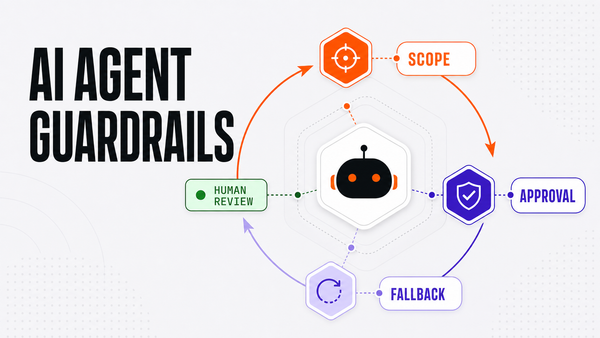
Direct answer: human-in-the-loop AI for small business means AI can read context, draft work, recommend next steps, and route exceptions, but a person approves high-impact actions such as booking changes, dispatch decisions, estimate follow-ups, invoice reminders, review replies, refunds, pricing, and public customer responses. For home-service companies, this is the safest path between manual admin work and reckless automation.
Why home-service teams need approval gates
Home-service small businesses are not dealing with abstract workflows. They are handling missed calls, urgent booking windows, technician schedules, dispatch exceptions, estimate follow-up, invoice reminders, warranty questions, review replies, and unhappy customers. Those workflows affect trust and revenue, so AI should not be allowed to act without a clear permission model.
The useful version of AI is not "let the bot run everything." The useful version is: AI prepares the work, shows the source context, routes the risky cases, and keeps the final decision with the right owner until the workflow earns more trust.
The home-service permission ladder
| Layer | AI can do this | Human gate | Home-service example |
|---|---|---|---|
| Read-only context | Summarize records, calls, notes, invoices, jobs, and CRM history. | Human resolves source conflicts. | Summarize a missed HVAC call before a CSR replies. |
| Draft-only output | Prepare messages, task notes, follow-up options, and internal summaries. | Staff edits or approves before sending. | Draft an estimate follow-up after a quote goes cold. |
| Recommend and route | Suggest owner, queue, escalation level, and next action. | Manager handles exceptions. | Route a warranty complaint to the service manager. |
| Execute with approval | Complete approved internal updates, reminders, and handoffs. | Approval is logged before action. | Create a follow-up task after an owner approves the wording. |
| Never execute | Stay blocked from trust-sensitive or irreversible actions. | Hard policy gate. | Refunds, pricing changes, legal language, public replies without review. |
Where this shows up in the business
Calls and booking: AI can summarize missed calls, draft callbacks, find available booking windows, and prepare options. A CSR or owner should approve unusual timing, pricing questions, upset customers, or emergency scheduling changes.
Dispatch and technician scheduling: AI can flag conflicts, surface capacity issues, and route exceptions. Dispatch changes that affect customers, technicians, arrival windows, or revenue should stay human-approved.
Estimates and invoices: AI can draft follow-ups and summarize payment status, but discounts, refund language, disputed invoices, collections-sensitive messages, and warranty concerns need a clear owner gate.
Reviews and public replies: AI can draft response options and collect source context. Public responses should stay in review because tone, policy, and local reputation matter.
What to measure before expanding autonomy
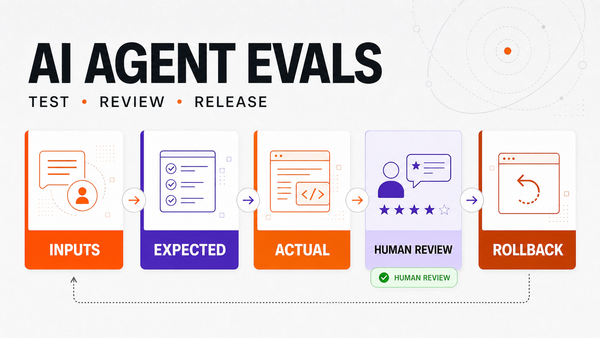
Track accepted drafts, rejected drafts, missing-context incidents, failed tool calls, approval latency, unresolved exceptions, source freshness, workflow cycle time, and owner confidence. These measures show whether AI is reducing admin drag without creating operational risk.
If a workflow has high rejection rates, missing source context, unclear owners, or repeated exceptions, it is not ready for more autonomy. That does not mean the AI failed. It means the workflow needs better source data, clearer rules, or a narrower launch scope.
How Omni Studio fits
Omni Studio builds managed AI operations for businesses that need practical workflows, not generic AI hype. For home-service companies, the first win is usually a controlled workflow with clean source systems, approval gates, eval examples, and a monitoring rhythm after launch.
If you are evaluating this for your company, start with the AI Ops readiness scorecard to see whether one workflow is ready. For implementation planning, use the AI automation audit. For ongoing ownership after launch, review managed AI Ops.
Related home-service AI workflows
- AI receptionist for home services
- HVAC AI answering service
- Plumbing AI answering service
- AI dispatcher for home services
- AI customer follow-up for contractors
- Estimate follow-up automation for contractors
- Invoice follow-up automation for home services
FAQ
What is human-in-the-loop AI for small business?
Human-in-the-loop AI for small business means AI can read context, draft work, recommend next steps, and route exceptions while a person approves high-impact actions such as booking changes, dispatch decisions, estimate language, invoices, review replies, refunds, pricing, and public responses.
Which home-service AI actions should require approval?
Calls, booking changes, dispatch exceptions, estimate follow-ups, invoice reminders, refund language, warranty concerns, public review replies, and customer-facing complaints should stay approval-gated until the workflow has enough evidence and a named owner.
How should a home-service business start with human-in-the-loop AI?
Start with one workflow, define source systems, list actions AI can read or draft, name the human approver, create test examples, launch draft-first, and review accepted drafts, rejected drafts, failed tool calls, and exceptions weekly.
How does Omni Studio help with human-in-the-loop AI operations?
Omni Studio maps the workflow, source systems, permissions, approval gates, eval examples, launch path, monitoring rhythm, and managed AI Ops loop so AI supports operations without creating uncontrolled public, financial, or customer-facing risk.